RWX
RWX and Captain work together to run your tests and provide you with test result data directly in RWX.
Here, we'll walk through everything needed to integrate Captain with RWX:
Installing Captain
Add a task that uses the rwx/install-captain package to install the Captain CLI.
tasks:
  - key: captain
    call: rwx/install-captain 1.2.0
Integrating Captain with your test framework
Captain integrates with many test frameworks. Find instructions for your specific test framework here.
This example integrates with Ruby's RSpec but can be used as a baseline for integrating with a different framework.
tasks:
  # ... tasks that clone your repo, setup Ruby, etc. here
  - key: captain
    call: rwx/install-captain 1.2.0

  - key: rspec
    use: captain # you'll likely also depend on your code, your Ruby dependencies, etc.
    run: |
      captain run captain-examples-rspec \
        --command "bundle exec rspec --format json --out rspec-results.json --format progress" \
        --test-results "rspec-results.json" \
        --print-summary
There's no need to specify an RWX_ACCESS_TOKEN when using Captain with RWX. RWX automatically provides an access token to Captain with permissions to save test results to Captain Cloud.
Viewing test results
RWX will display your test results directly in the UI:
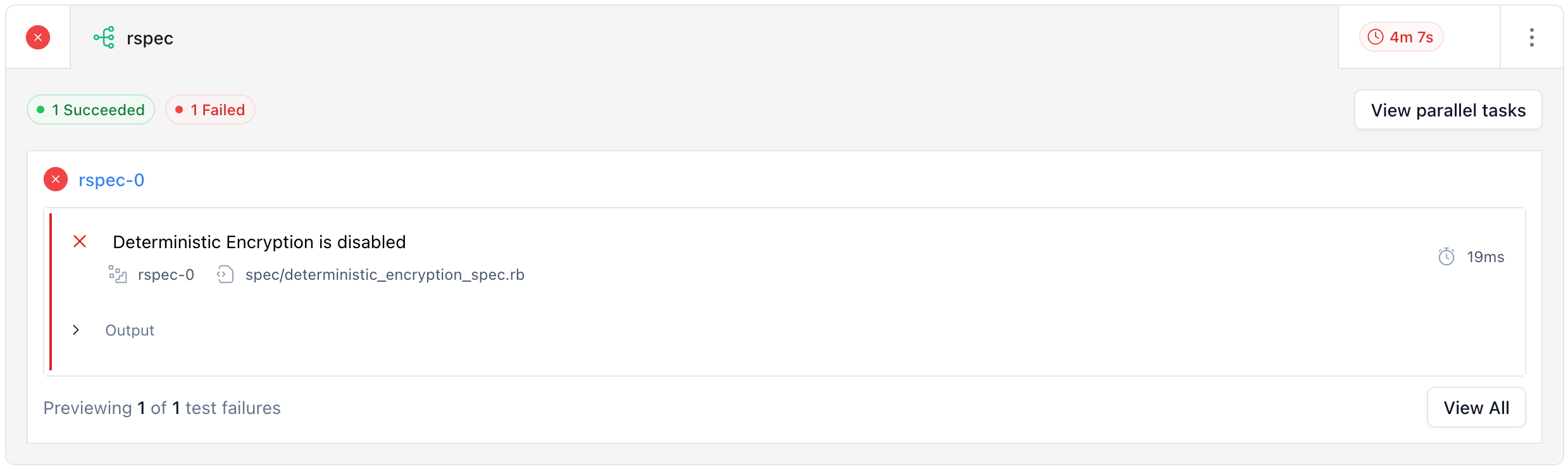
Captain will also automatically output an RWX link linking to your test results inside of Captain, and the results in Captain will link back to RWX.
Partitioning
Captain's partitioning feature works with RWX parallel tasks. You just need to give Captain a partition-command and partition-globs, and declare parallel on your task. RWX automatically provides the partition-index and partition-total to Captain, so you don't need to specify those.
tasks:
  - key: captain
    call: rwx/install-captain 1.2.0

  - key: rspec
    use: captain # you'll likely also depend on your code, your Ruby dependencies, etc.
    parallel: 8
    run: |
      captain run captain-examples-rspec \
        --command "bundle exec rspec --format json --out rspec-results.json --format progress" \
        --partition-command "bundle exec rspec --format json --out tmp/rspec.json --format progress {{ testFiles }}" \
        --partition-globs 'spec/**/*_spec.rb' \
        --test-results "rspec-results.json" \
        --print-summary
Retrying failed tests
If you configure a retry command for Captain, RWX will show a "Retry failed tests" action on the test task that re-runs only the tests that failed:
tasks:
  - key: captain
    call: rwx/install-captain 1.2.0

  - key: rspec
    use: captain # you'll likely also depend on your code, your Ruby dependencies, etc.
    parallel: 8
    run: |
      captain run captain-examples-rspec \
        --command "bundle exec rspec --format json --out rspec-results.json --format progress" \
        --retry-command "bundle exec rspec --format json --out rspec-results.json --format progress {{ tests }}" \
        --retries 2 \
        --test-results "rspec-results.json" \
        --print-summary
{{ tests }} expands to the failing test identifiers, and retries tells Captain how many times to automatically retry each failing test inline before the task fails. See Captain's retry options for the full set of options and your test framework's Captain docs for framework-specific examples.
If you are also using ABQ, you will need to supply the --local flag to ABQ
in your retry command.