Notifications
You can configure notifications for your whole organization or for you individually.
Organization notifications
Manage organization notifications
For organization notifications, you can configure them to be sent to any email address that you specify.
If using Slack, you can configure notifications to be posted to a Slack channel.
Recommended notifications
Engineering teams commonly set up organization notifications for:
- Runs that fail on
mainor release branches - Cron runs that fail
Personal notifications
Personal notifications can be sent to the email address set on your RWX account.
If you use Slack, you can also configure personal notifications to be sent to you as direct message from the RWX app for Slack.
Notification types
You can currently configure notifications for:
CI/CD
- Run results
- Vault approval requested
- Task breakpoint ready
Captain
- Captain flake rate
- Captain test quarantined
- Captain test unquarantined
Dispatching runs from notifications
Notifications can be configured to trigger runs using dispatch triggers.
For example, you might dispatch a run to request a review when a pull request run completes successfully. To do this, create a notification in RWX.
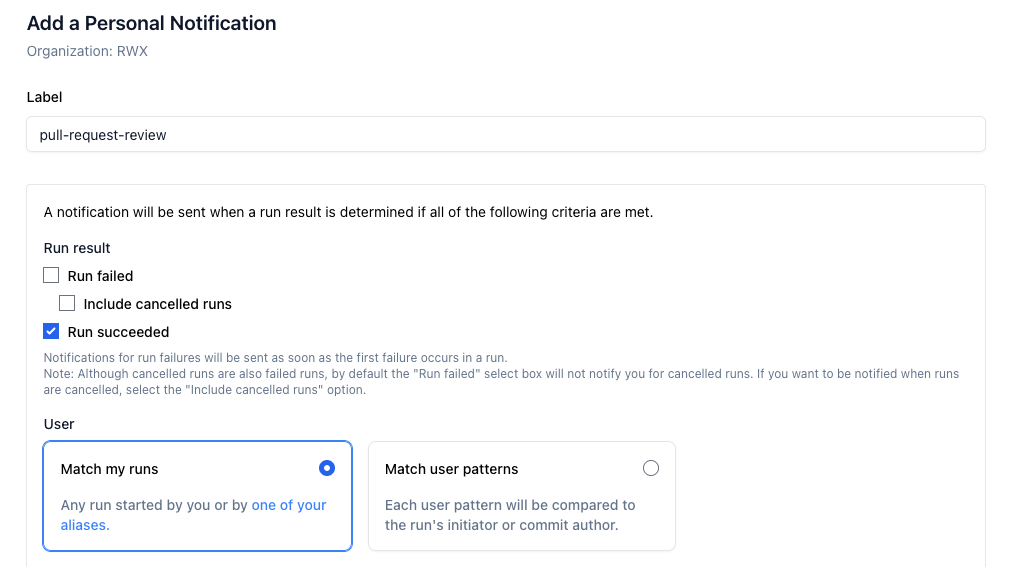
After creating the notification, scroll to Delivery methods and select Dispatch run. From there, you can choose from your organization’s existing notification dispatch definitions.
If you need a new dispatch definition, you can create one by pushing a notification dispatch definition to your repository.
A notification dispatch definition is a dispatch definition that includes a notification parameter.
on:
  dispatch:
    key: submit-for-review
    init:
      notification: ${{ event.dispatch.params.notification }}
    title: 'PR review automation'
    params:
      - key: notification
        required: true

tasks:
  - key: github-cli
    call: github/install-cli 1.1.0

  - key: request-review
    use: [github-cli]
    run: |
      PR_URL=$(echo "${NOTIFICATION}" | jq -r '.pullRequestUrl')
      ...
    env:
      GITHUB_TOKEN: ${{ github-apps.your-bot.token }}
      NOTIFICATION: ${{ init.notification }}
Once your notification dispatch definition is pushed, it will appear as an option when configuring a notification to dispatch a run. When the notification event occurs, the run is automatically dispatched with the notification parameter populated.
Testing
You can configure your RWX notification to dispatch a run using a custom ref.
In addition, you can also test your run definition from the command line using a notification fixture.
rwx run .rwx/my-notification-dispatch.yml \
  --init "notification=$(cat notification.json)" \
Example notification payloads are available in the dispatch run settings for your notification.