Give your agent one platform for sandboxes and CI

We're excited to roll out RWX sandboxes today, giving coding agents (and humans) one platform for the inner loop of running individual tests, and the outer loop of running all of CI.
Coding agents need somewhere to actually run code, and the sandbox space has fragmented quickly, with every platform taking a different swing at what a "sandbox" should even be. The right sandbox is the one that is easy to configure with your application's environments, without juggling images or snapshots.
Why RWX sandboxes work well for agents
Different approaches to sandboxing work better for different use cases, and a standard answer to "what is a sandbox" is still in flux. RWX sandboxes keep your agent running locally while offloading execution to the cloud. This agent outside approach gives you:
- Full local control: Your agent runs on your machine, with your configuration, your tools, and your oversight
- Fast cloud execution: RWX's content-based caching means sandbox environments spin up in seconds, not minutes
- Reproducible environments: The same run definitions you use for CI work for sandboxes, so your agent tests against the same environment as your pipelines
- Multi-agent isolation: Multiple agents can work in parallel locally, each with its own dedicated sandbox, without stepping on each other
- Automatic syncing: Local changes sync up to the sandbox before each command, and back down after, so the agent always sees the latest state
- No local environment required: The sandbox is the environment, useful when your agent is running somewhere other than your laptop, like Claude Code on the web
This tight feedback loop between local development and cloud execution is central to how RWX tooling works, and sandboxes just extend that pattern to agentic workflows.
In our own internal usage over the last few months, RWX sandboxes have been invaluable when working with coding agents in git worktrees, which are now first-class features of agentic tools like Claude Code, Codex, and Cursor. If you're executing code in a sandbox, setting up your local environment for every git worktree is moot, particularly for backend code changes.
A full application development environment, not just CI/CD
The reason that model works is that RWX isn't just a CI/CD platform. It's an application development environment that happens to power both sandboxes and CI today, with more surfaces to come. An RWX sandbox is a persistent environment set up using the same run definitions used for CI/CD, which also means that sandboxes benefit from the same content-based caching used elsewhere on RWX, resulting in fast startup of exactly the environment you need for testing, rather than spinning up a blank VM.
Other platforms require setting up out-of-band images or snapshots, but RWX content-based caching means you get the benefit of snapshots, without the overhead of having to manage them. Snapshots effectively happen automatically as tasks run on RWX.
Merging the "inner loop" and the "outer loop"
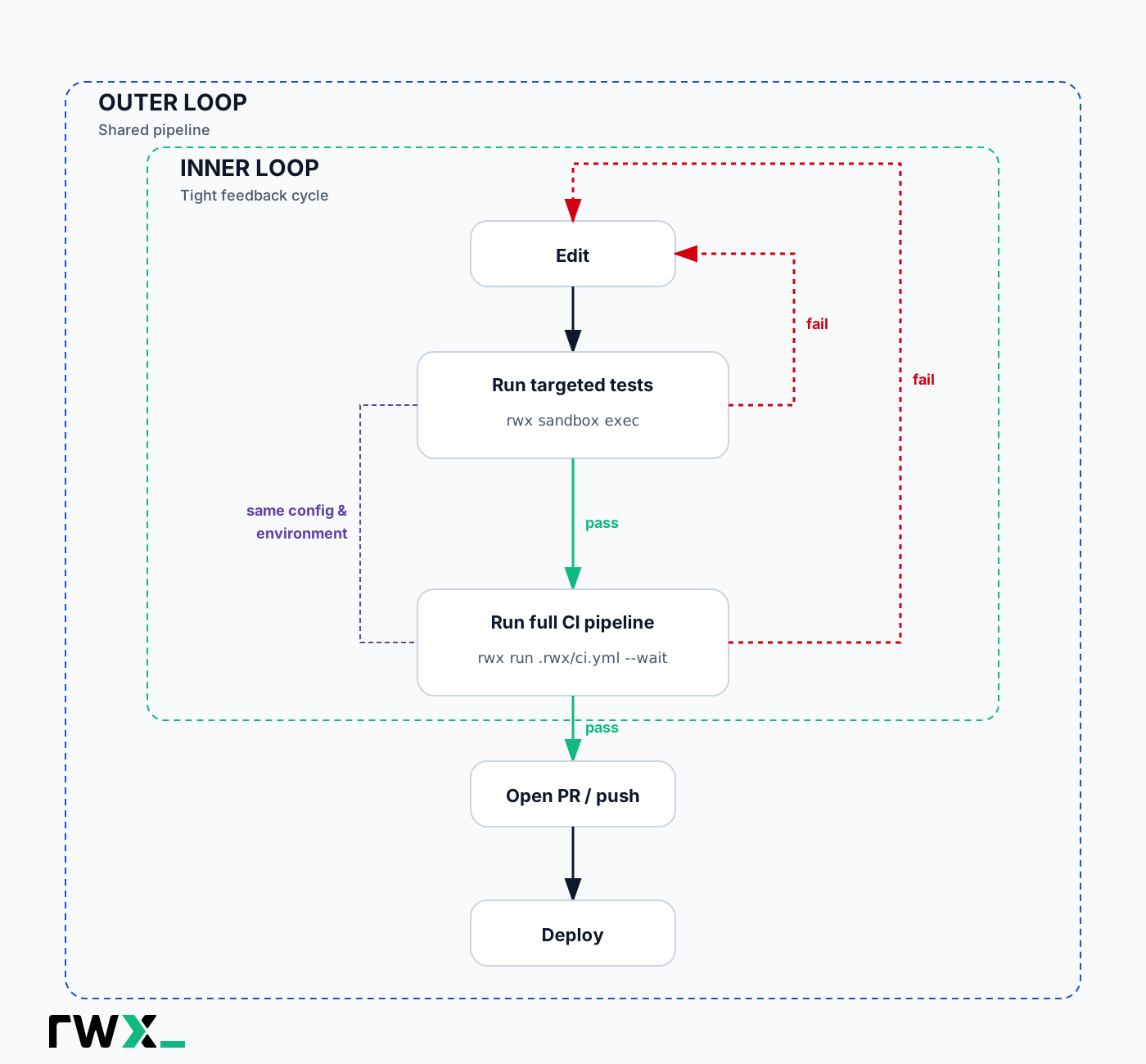
RWX sandboxes bring the "inner loop" of software development (the process of a single engineer working locally on their code, standing up their stack, running their tests, etc) closer to the "outer loop" (CI, integration tests, deploys, and everything else that runs once a change leaves the developer's machine), by using the same config and distributed compute for both of those loops. It's one shared application development environment, with no Docker or OCI images to maintain along the way.
That convergence matters more than ever for agents. With RWX, you give the agent a single CLI that spans both loops: it can verify targeted changes in a sandbox, then verify the entire CI pipeline, all before it pushes. No mechanism-switching between the inner loop and the outer loop.
Getting Started
1. Initialize a Sandbox Configuration
rwx sandbox init
This creates .rwx/sandbox.yml with a starter template. Customize it for your project's environment. The same task definitions you'd use elsewhere on RWX work here.
A minimal sandbox configuration looks like this (see rwx-cloud/sandbox-example for a real, runnable Node.js example):
on:cli:init:commit-sha: ${{ event.git.sha }}base:image: ubuntu:24.04config: rwx/base 1.0.3tasks:- key: codecall: git/clone 2.0.7with:preserve-git-dir: truerepository: https://github.com/your-org/your-repo.gitref: ${{ init.commit-sha }}github-token: ${{ github.token }}- key: sandboxuse: coderun: rwx-sandbox
2. Execute Commands in the Sandbox
rwx sandbox exec -- npm test
Your local changes are automatically synced up to the sandbox before execution, and synced back down after execution. The sandbox persists between commands, so subsequent calls reuse the same environment.
Telling your agent how to use it
By installing the RWX skill, your agent will know how to use a sandbox when prompted. You can also tell an agent how to use a sandbox like this:
❯ Verify changes in a sandbox by running commands with `rwx sandbox exec`, and then ensure the entire build passes by running `rwx run .rwx/ci.yml --wait`⏺ Bash(rwx sandbox exec -- bundle exec rspec)… +7 lines (ctrl+o to expand)⏺ All 157 specs pass.⏺ Bash(rwx run .rwx/ci.yml --wait)… +12 lines⏺ CI pipeline passes.
See more in the docs.
Related posts

August 4, 2026
RWX raises $12M as the engineering bottleneck moves from writing code to validating it
RWX has raised $12M in Series A financing led by HPVP to rebuild the software forge for agentic software engineering.

February 19, 2026
Unlock agent-native CI/CD with the RWX Skill
RWX has launched an official skill for working with the RWX CLI and run definition files.