Better UX for managing changes via Terraform

The official RWX Terraform provider now manages vaults, service accounts, and group permissions.
As part of this work, we focused on the two problems that bother us most when we use Terraform ourselves:
- It's easy to accidentally create drift by making changes in the UI.
- It's frustrating when you get errors during
terraform applythat you didn't get duringterraform plan.
Here's how we tried to avoid these pitfalls with our provider.
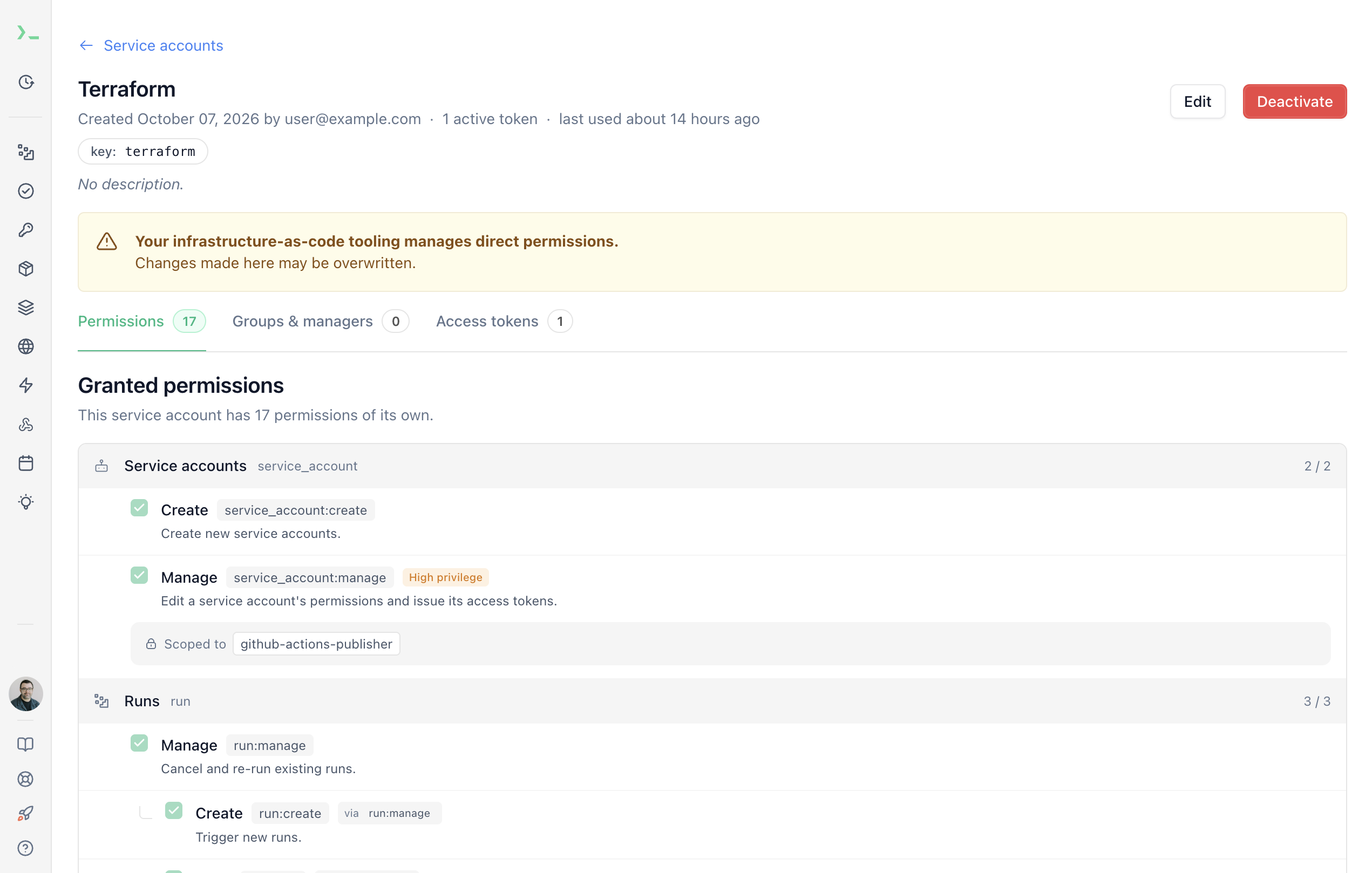
Flag resources that Terraform manages
If you've used products that offer both infrastructure-as-code and click ops, you've probably seen a surprise diff in terraform plan because someone changed something in the UI and never updated Terraform. There are plenty of valid use cases for click ops, but then someone has to decide whether to keep or revert the change before the PR can merge.
The RWX provider sends our server a specific X-RWX-Terraform-Management header whenever it starts or stops managing a resource. This header either rides along with the underlying API call to write data, or is part of a separate API call when importing resources, and it allows us to persist that IaC ownership server-side on those records.
From there, we can display warnings in the RWX UI, denoting when a resource is managed via IaC. These warnings are non-blocking, because again, sometimes the right move is to make a change directly in the UI and then update IaC afterward, but they reduce the chance that a team will be surprised by drift later.
Reduce apply surprises by validating more during the plan stage
A successful terraform plan doesn't guarantee a successful terraform apply. Some checks depend on the remote service and aren't performed until changes are applied. However, if there are permission limitations or other validation errors, you may not know about those until you run terraform apply. Since your Terraform code is likely under version control, you've probably just merged a PR and now need either another PR or a manual apply after someone fixes the permissions. Worse, it may not be clear what applied and what didn't.
The RWX provider validates more at plan time. For example, when the Terraform plan calls for assigning certain permissions to a service account or group in RWX, the provider will make an API call to get the actual catalog of permission keys the authenticated user is allowed to grant. If the plan asks for a key you can't grant, the plan fails, so you can fix it before you apply.
Error: Permission cannot be grantedwith rwx_service_account_permissions.example,on main.tf line 17, in resource "rwx_service_account_permissions" "example":17: permissions = [{ key = "cron:manage" }]The acting token cannot grant "cron:manage". Check its authority and theresource ID.
The provider is available now on the Terraform Registry.
Never miss an update
Get the latest releases and news about RWX with our newsletter.
Never miss an update
Get the latest releases and news about RWX with our newsletter.
Related posts

September 9, 2026
Trigger RWX CI and Sandboxes from Jujutsu repos
RWX CLI 3.27.0 adds support for running CI and Sandboxes from Jujutsu repos, including non-colocated repos with no .git directory.

September 8, 2026
Cursor and RWX bring first-class CI integration to Origin's marketplace
RWX is now an official marketplace integration of Cursor Origin. Teams using Origin can trigger CI runs and report results natively with RWX today.
